Type 100 KB, 50 KB or 20 KB — Image Resizer PC finds the best quality that fits, automatically. Nothing is uploaded: your passport, visa and ID photos never leave your PC.
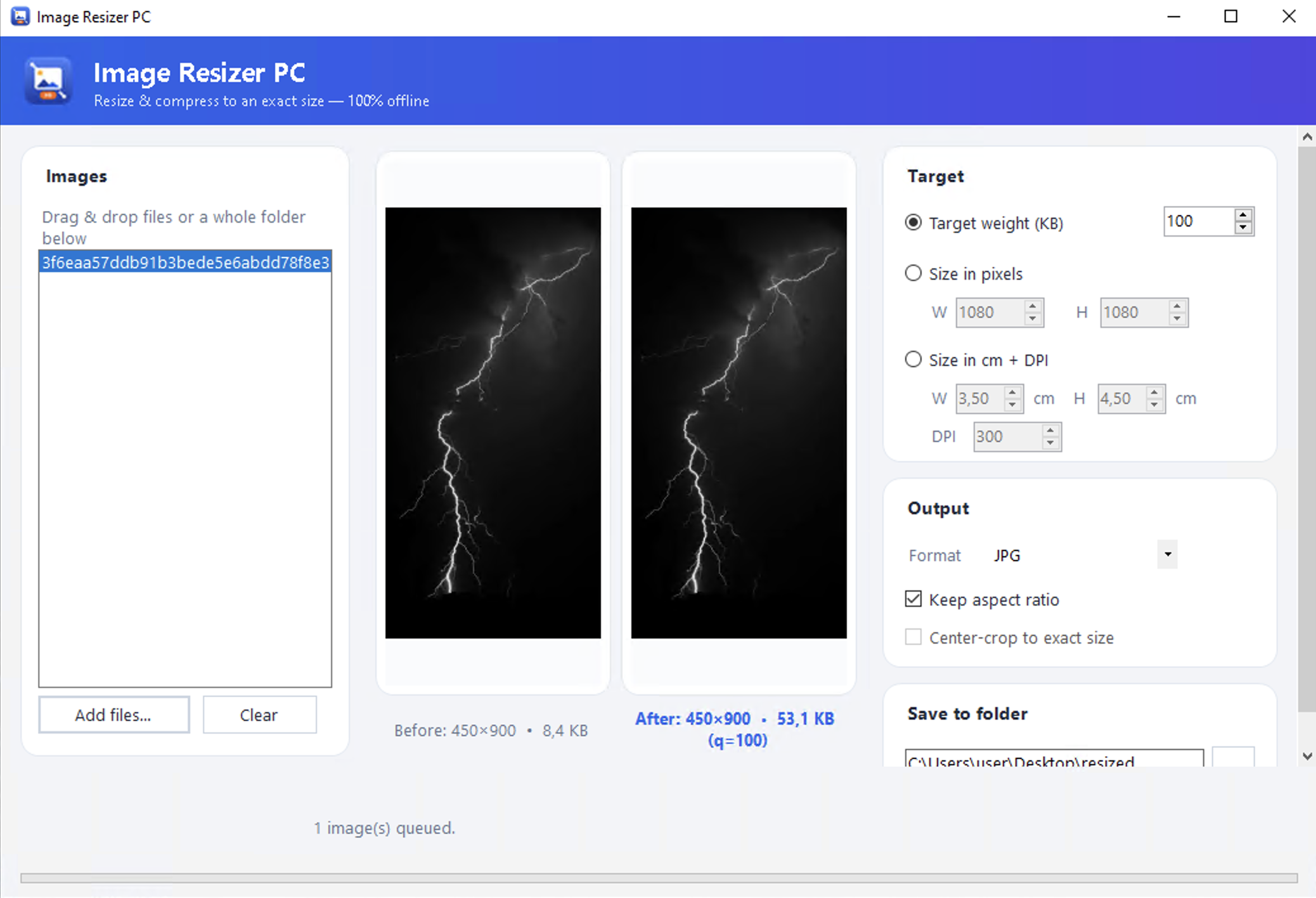
Government portals, visa forms and exams cap uploads at a precise size. Set the number — the app lands at or under it.
Set a target in KB. The app binary-searches the quality — and downscales when needed — to land at or under it.
Resize by pixel dimensions, or by physical size — 3.5 × 4.5 cm @ 300 DPI for a passport photo.
Drag in files or an entire folder and process them all at once. No per-file limit, ever.
Fit neatly within a box, or crop to an exact width × height when the form demands it.
Convert between the common formats while you resize and compress — all offline.
See the new dimensions and the exact file weight in KB before you save a single file.
Most tools that hit an exact KB make you upload a scan of your passport, signature or ID to a server you don't control. Image Resizer PC does the opposite — every byte is processed locally. No upload. No account. No tracking. You can even run it with the Wi-Fi off.
Set the physical size in cm + DPI, crop to the box, then squeeze under the KB cap — DS-160, OCI and more.
Passport photo resizer →Dial in the exact photo and signature caps for SSC, IBPS, UPSC, RRB, GATE, TNEA and more.
Exam photo & signature resizer →Shrink a whole folder of photos to post, email or archive — without the bulk, in one pass.
Batch image resizer →Any online form that rejects files over a set size — resize to fit the first time.
Compress image to KB →| What matters for a size-capped upload | Typical online tool | Image Resizer PC |
|---|---|---|
| Works fully offline — nothing uploaded | ✗ | ✓ |
| Type an exact KB target, auto quality | partial | ✓ |
| Batch a whole folder at once | ✗ | ✓ |
| Resize by cm + DPI (passport sizing) | rare | ✓ |
| No account, no watermark, no limit | partial | ✓ |
| Keep it installed for repeat use | ✗ | ✓ |
We won't pretend to be perfect: at very small targets some visible compression is unavoidable — we give you the best quality that still fits, and we never promise "zero quality loss."
A single portable .exe — no installer, no .NET to set up. Unzip and run.
More info → Run anyway. This fades as more people download it — and disappears once the app is signed. Image Resizer PC